
Relecture AI for Mac, iPhone and iPad
Send every email with confidence.
Relecture AI checks and improves what you write, in any Mac app and in several languages: forgotten attachments, wrong totals, typos, tone. Write the rough version and review a clean one. The AI runs on your Mac by default and your text stays there.

- 5 actions
- 11 app languages
- 3 local models
- On your Mac by default
For the best results
For the best results
Choose the AI that fits the job.
Your Mac keeps your text private and handles checks and quick drafts. For the best translations and rewrites, switch in one click to a larger model on your own server, or to Claude online.
You pick the AI for each action. The checks need no AI at all.
How it works
Three steps, in any app
From a draft to a message you can send, without leaving what you are doing.
-
Select or paste your text
Select text in Mail, Outlook, Notes or your browser, then right-click and choose one of the AI actions in Services or Share. Or copy it and press Control-Option-Command-R. Or type or paste it in the main window.

-
Pick an action
Check is free, instant and needs no AI. Reformulate, Reply, Summarize and Translate use the AI: on your Mac by default, or Claude, or your own server. Set the length and the tone, add a one line instruction if you want, then press Generate.

-
Review, then copy
Every change and every alert is shown. Untick what you do not want, then copy the result or replace your selection. Nothing is replaced behind your back.

What it does
Four things it does for you
Checks that need no AI are free and unlimited. The AI actions run on your Mac by default, with Claude online if you subscribe, or on your own server.
Check
- Announced count against content
- Attachment announced but missing
- Amounts, totals and dates that do not add up
- Greeting against recipient, closing words twice
- Spam words, placeholders left, empty subject, test links
- Typography: non-breaking spaces, quotes, apostrophes, for French and English
Write
- Reformulate: short, medium or long
- Tone: formal, warm, firm but polite
- Reply with AI from the received mail, with one line of instruction
- Safety checks on amounts and dates in replies
- Write like me, from a few of your own emails
- Claude online for the best replies, with your consent
Understand
- Summarize a mail or a whole conversation
- WhatsApp, Messages, Slack: copy, then summarize
- Actions and dates extracted from the text
- Translate into 23 languages
- Reply in the sender's language, with a translation under it
Yours
- The AI runs on your Mac by default, your text stays there
- Or Claude online, or your own server: you pick the AI for each action
- Changes shown in a preview, nothing replaced blindly
- Tick or untick every correction
- Models you choose, the recommended one picked for you
- No account, no advertising
- The app in 11 languages
See it at work
One window, five ways to help
Real windows of the app, one situation at a time.
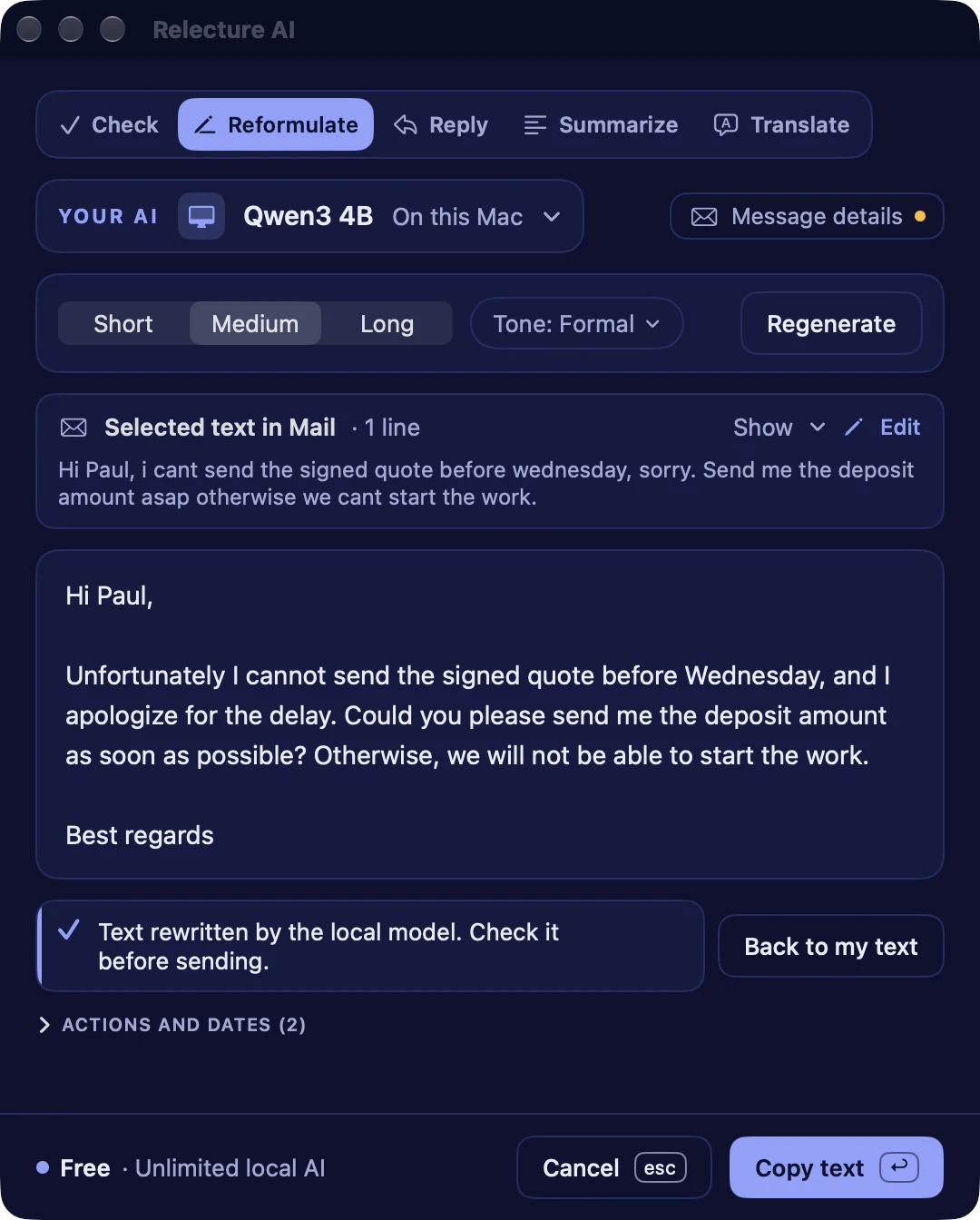
Your rough draft, ready to send
Write it the way it comes. Relecture AI rewrites it in the length and the tone you choose, and keeps your meaning.
- Short, medium or long. Neutral, formal, warm or firm but polite
- Write like me: it imitates your own style, learned from emails you give it
- The original stays one click away with Undo
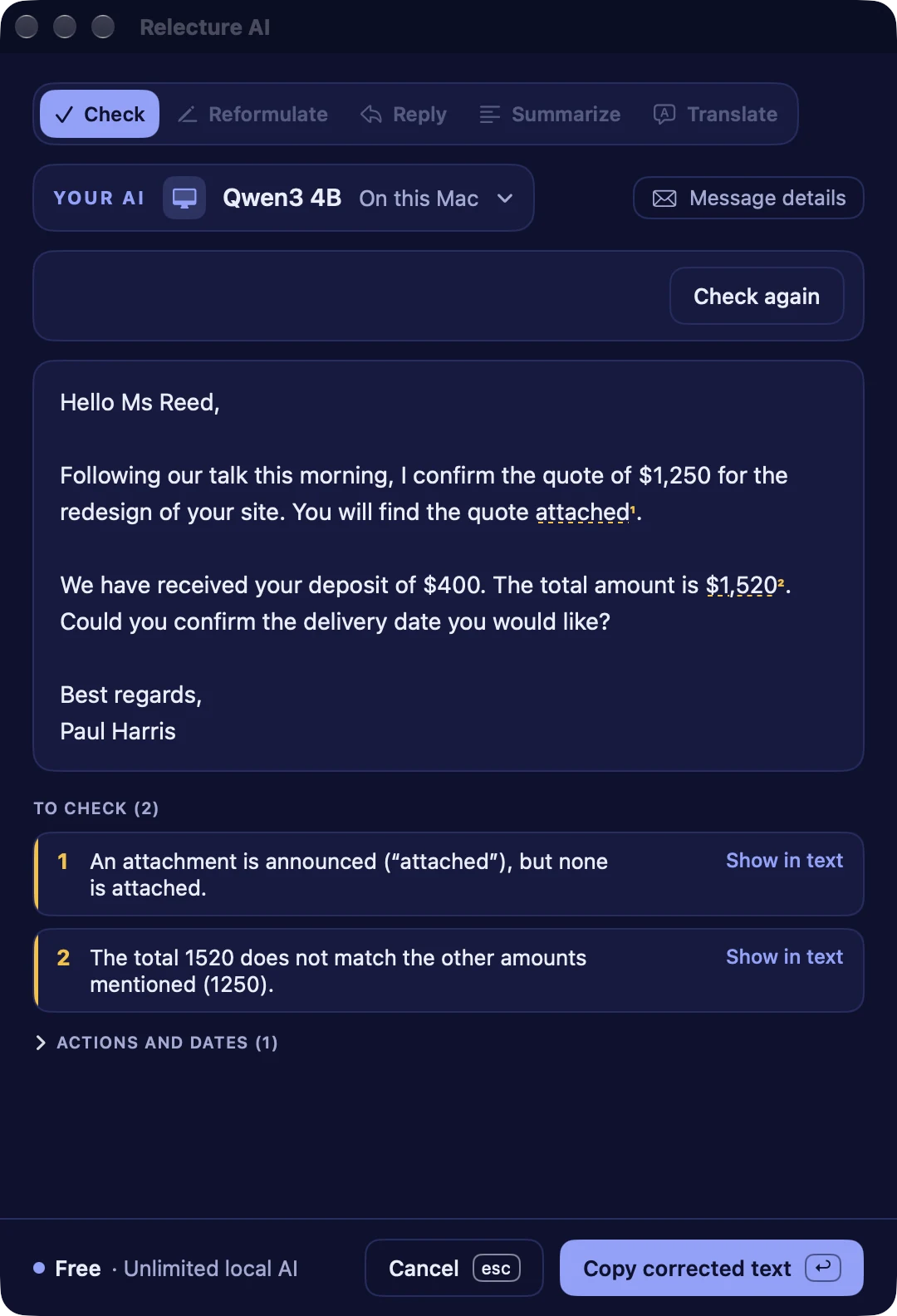
Catch what a quick read misses
Relecture AI reads your draft like a careful colleague and flags what would make you look sloppy.
- An attachment announced but missing, a placeholder left, an empty subject
- Totals, amounts and dates that contradict each other
- A greeting that does not match the recipient, closing words twice, spam words
Draft the answer, keep the decision
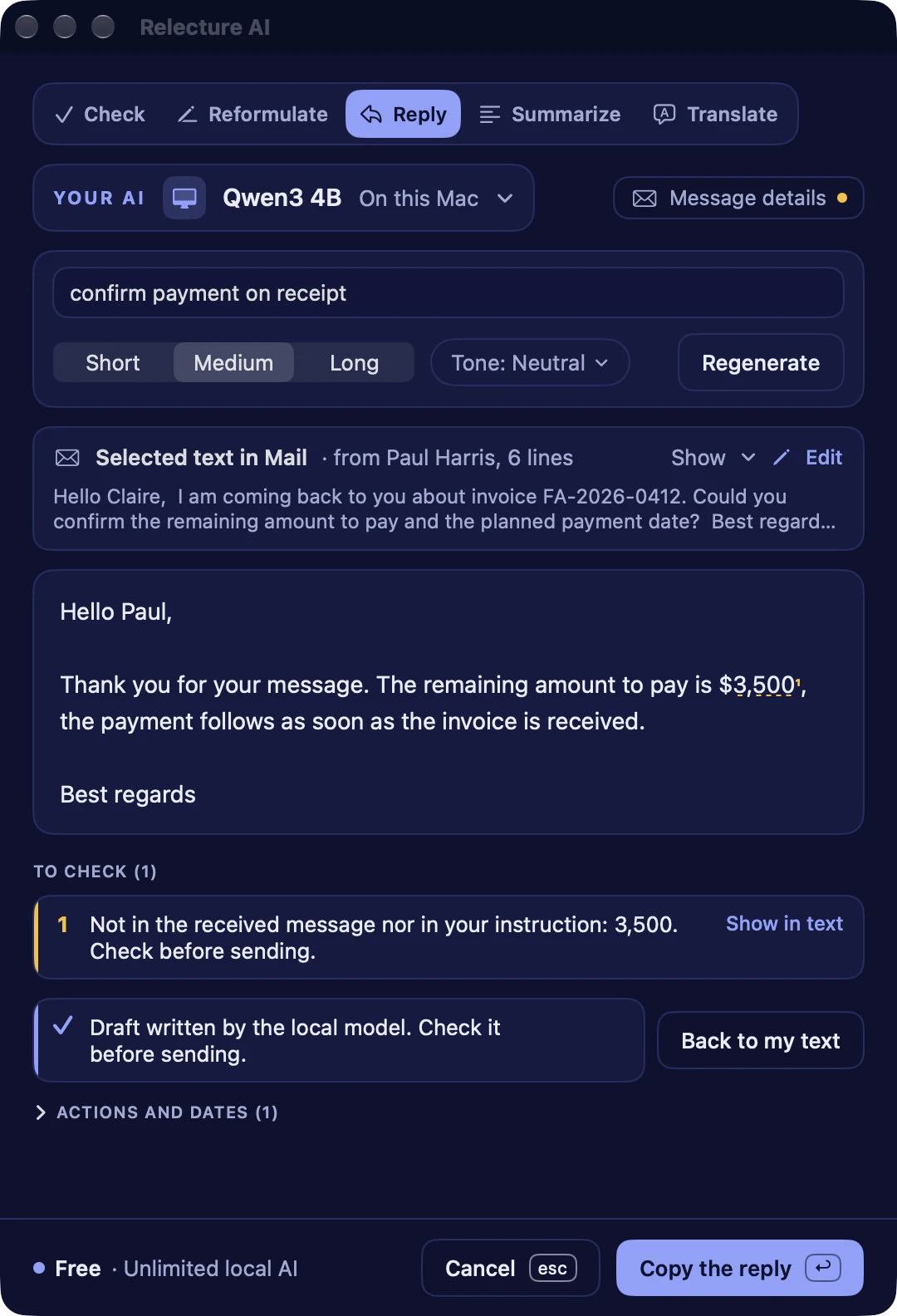
Relecture AI reads the received mail and drafts a reply you can edit. You choose the length and the tone and can add a one line instruction, such as confirm Friday.
- A warning when an amount or a date is not in the mail nor in your instruction
- It replies in the language of the sender, with a translation under it
- Regenerate keeps your settings, and the draft stays yours to edit
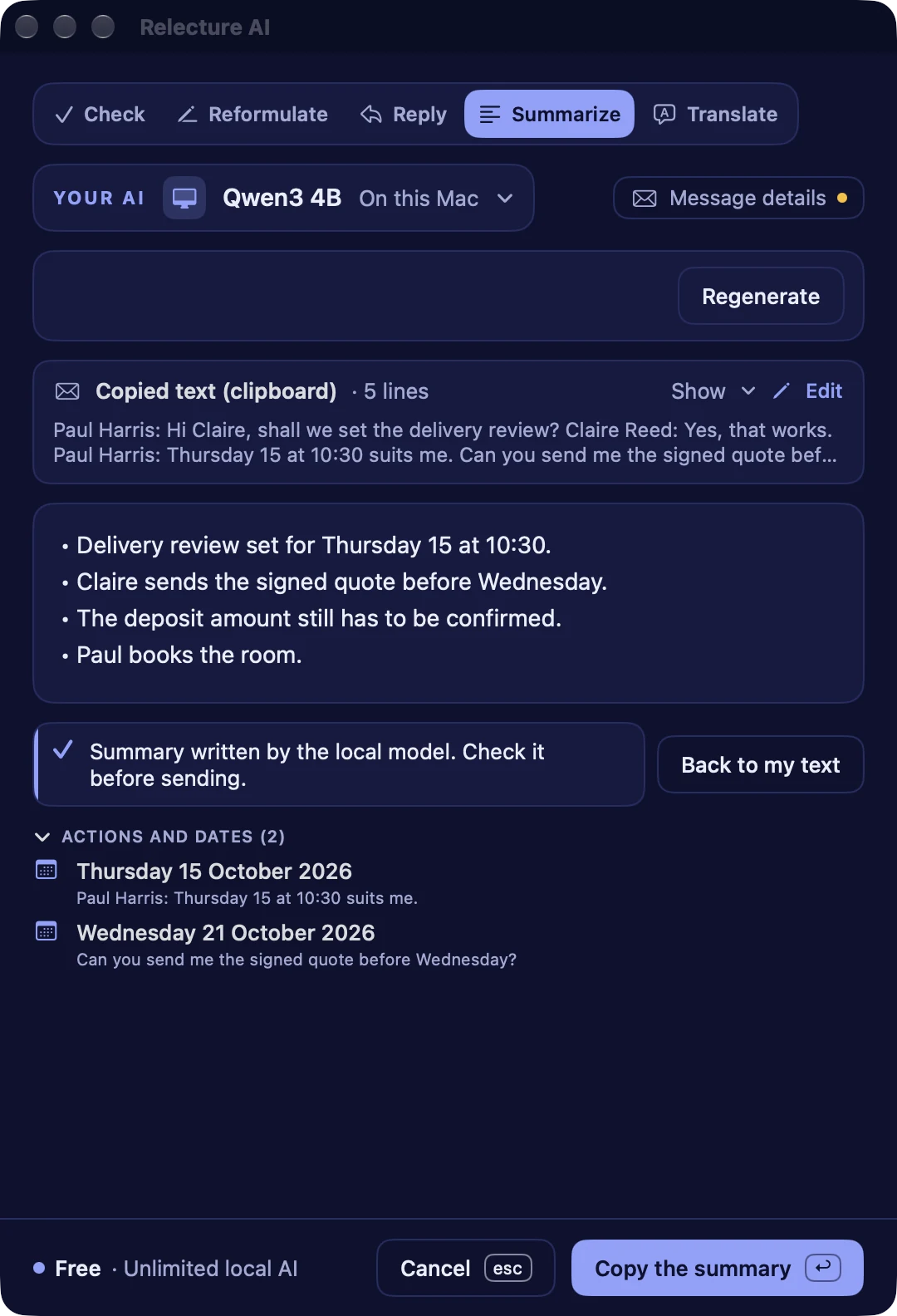
A long thread in a few lines
Copy a mail or a whole conversation from WhatsApp, Messages or Slack. You get the essentials, and the actions and dates found in it.
- The key points and what is left to do
- Dates and actions extracted from the text
- Everything stays on your Mac
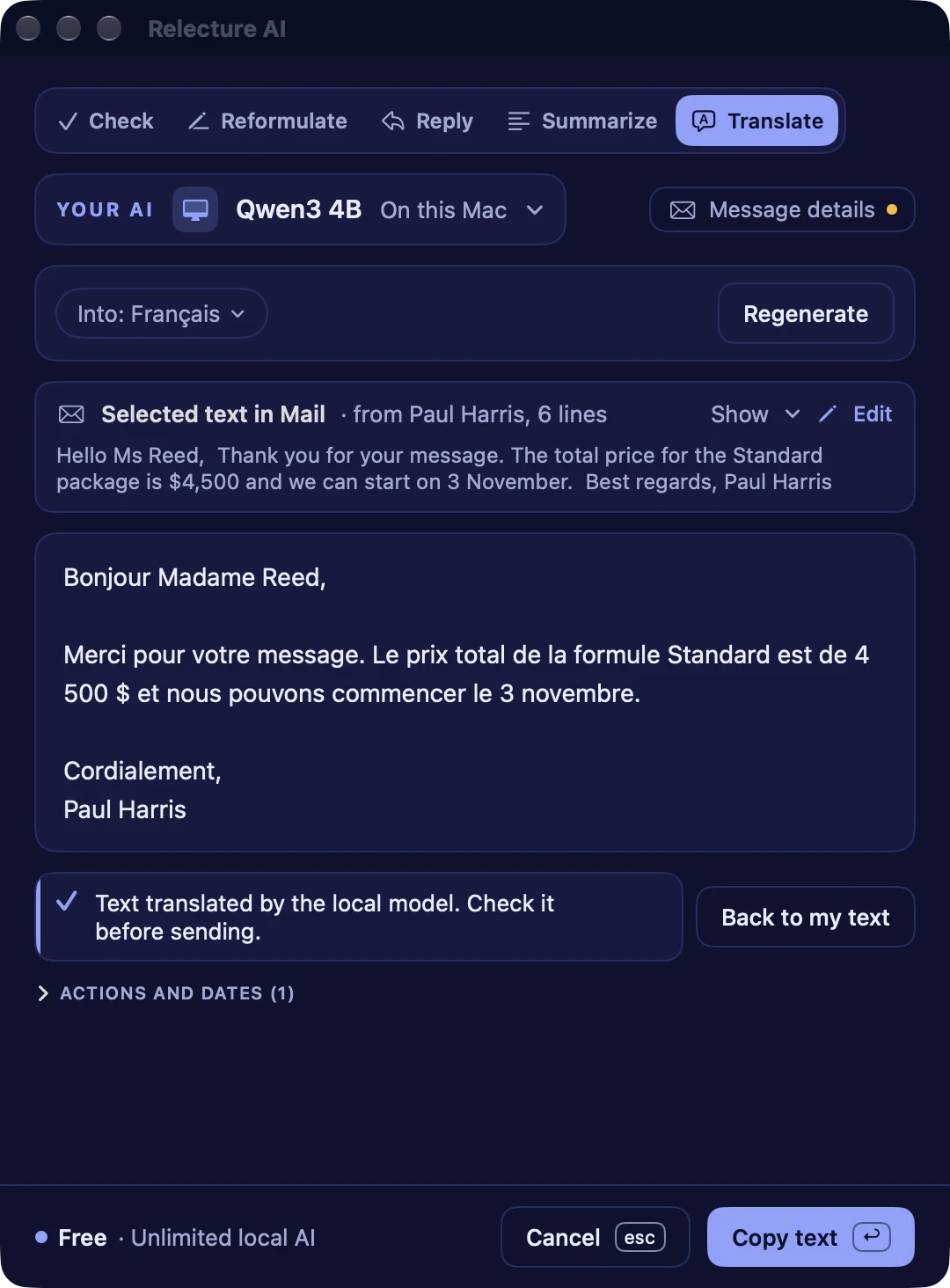
Write to anyone, in their language
Translate a message into 23 languages and review the result before you use it.
- 23 languages
- The tone of your original is kept
- The checks run on the result too
Help and a check before you send
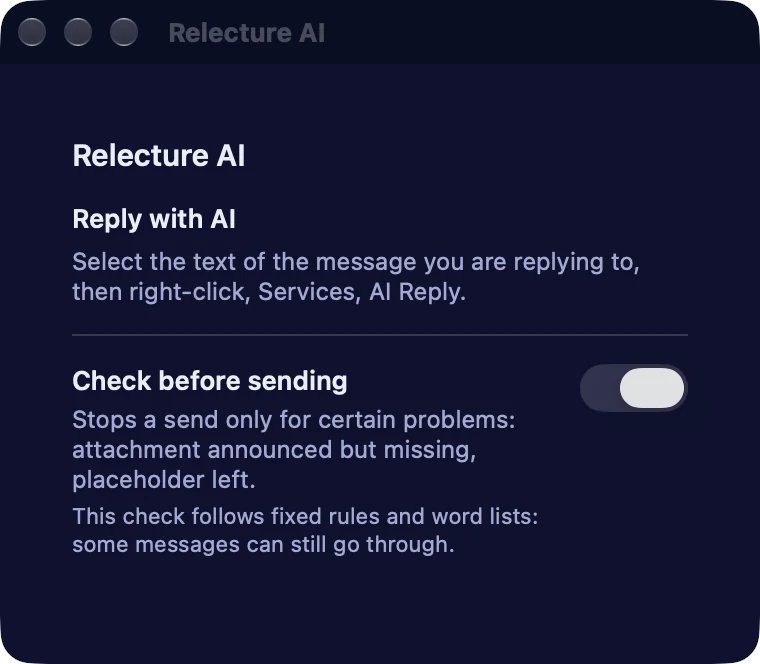
Turn on the Relecture AI extension in Mail and its panel in the compose window checks your draft before you send.
- The check is rule based: it flags a missing attachment or a placeholder left, and some messages can still go through
- Add your own words that announce an attachment, in the settings
- To draft a reply, select the mail text and choose AI Reply in Services or Share
Where it works
Works where you write
In Mail, Outlook, Notes, your browser: any app that lets you select text.
Right-click
Select text, right-click, then Services or Share: AI Check, AI Reply, AI Reformulate, AI Summarize, AI Translate.
Shortcut
Control-Option-Command-R checks the copied text, Control-Option-Command-E drafts a reply.
Main window and menu bar
Type or paste a text and do everything in the same window: pick an action, set it, Generate, copy. The menu bar has the same actions.
Apple Mail
A panel in the compose window gives help and checks your draft before you send. Replies come from Services or Share.
On iPhone and iPad
Relecture AI on iPhone and iPad
The same five actions, from the Share menu of any app. Pick Claude online or your own AI server, and one purchase covers your Mac, your iPhone and your iPad.
- Select text in Mail, Notes, Safari or your messaging app, tap Share, then Relecture AI. Copy the result and go back to paste.
- Five actions in the Share menu: AI Check, AI Reply, AI Reformulate, AI Summarize and AI Translate into 23 languages.
- Claude online with the subscription, or your own AI server with Pro, picked for each action.
- Siri, Shortcuts and Control Center buttons act on the text you copied (Control Center buttons need iOS 18).
- A full app to paste longer texts and work on them, on iPhone and iPad, in light and dark.
iOS 17 or later. The Apple Mail panel and the AI models downloaded to the device are Mac features.


Turn on the Mail extension
Turn on the extension in Mail
One minute, once. After that the Relecture AI button is in every compose window.
-
Open Mail Settings
In Mail, open the Mail menu, then Settings. Shortcut: Command comma.
-
Tick Relecture AI
Open the Extensions tab and tick Relecture AI in the list.
-
Find the button
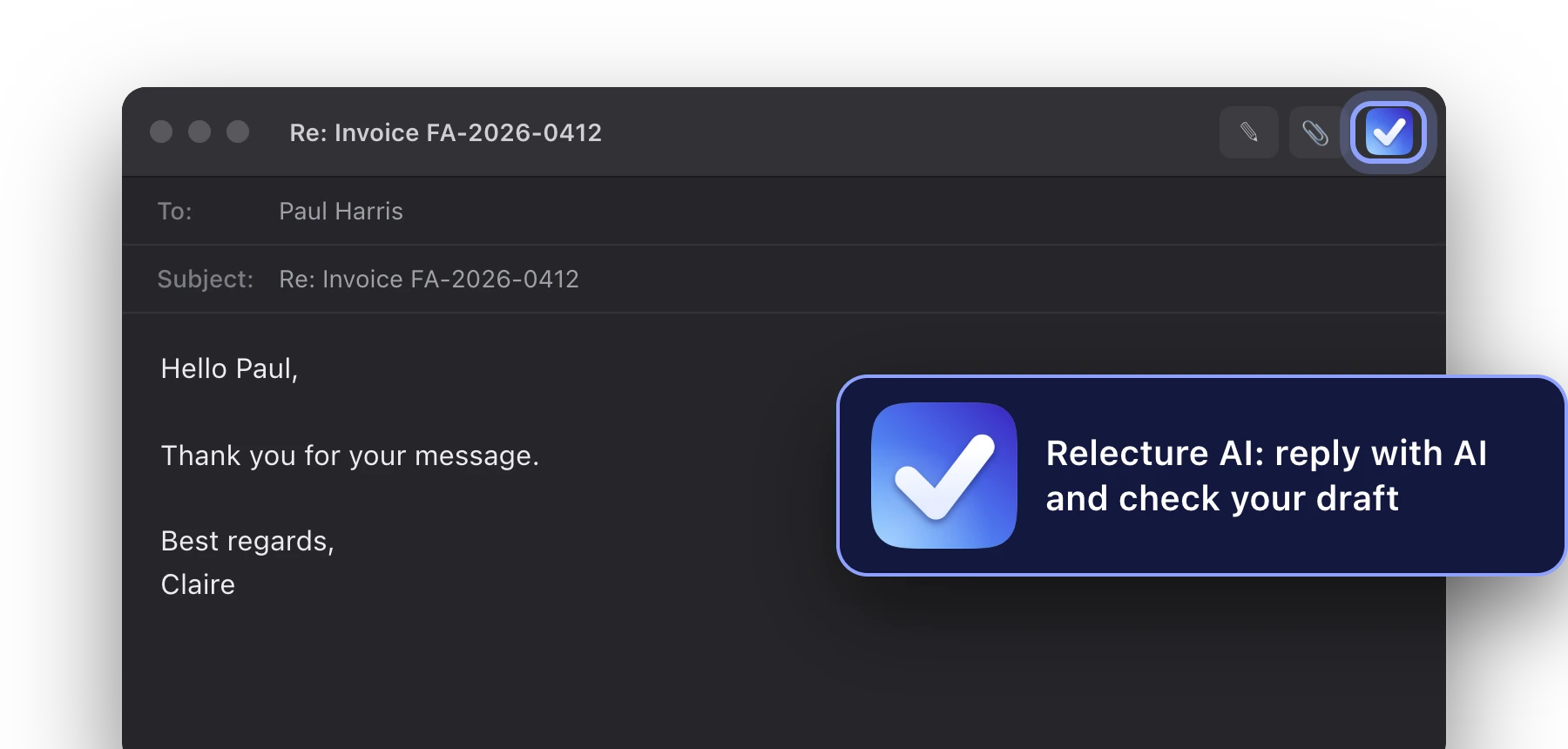
Open or reply to a message. The button appears in the compose window toolbar.


In Apple Mail
Right in the Mail window
Turn on the extension once, then open its panel from the compose window, and the AI actions from a right-click on any text.
The button in the compose window
Turn it on once: Mail, Settings, Extensions, tick Relecture AI. The button then appears in the compose window. Its panel gives help and checks your draft before you send. To draft a reply, use AI Reply from Services or Share.
Right-click, Services
Select text, right-click, Services, then AI Check, AI Reply, AI Reformulate, AI Summarize or AI Translate.

Right-click, Share
The same five actions are in the Share menu of the right-click.

Always at hand
One key away
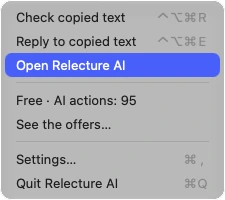
Relecture AI lives in your menu bar, so the check is there before you hit send.
- Control-Option-Command-R checks the text you copied
- Control-Option-Command-E drafts a reply to it
- The menu shows your remaining AI actions
Where the AI runs
You choose where the AI runs
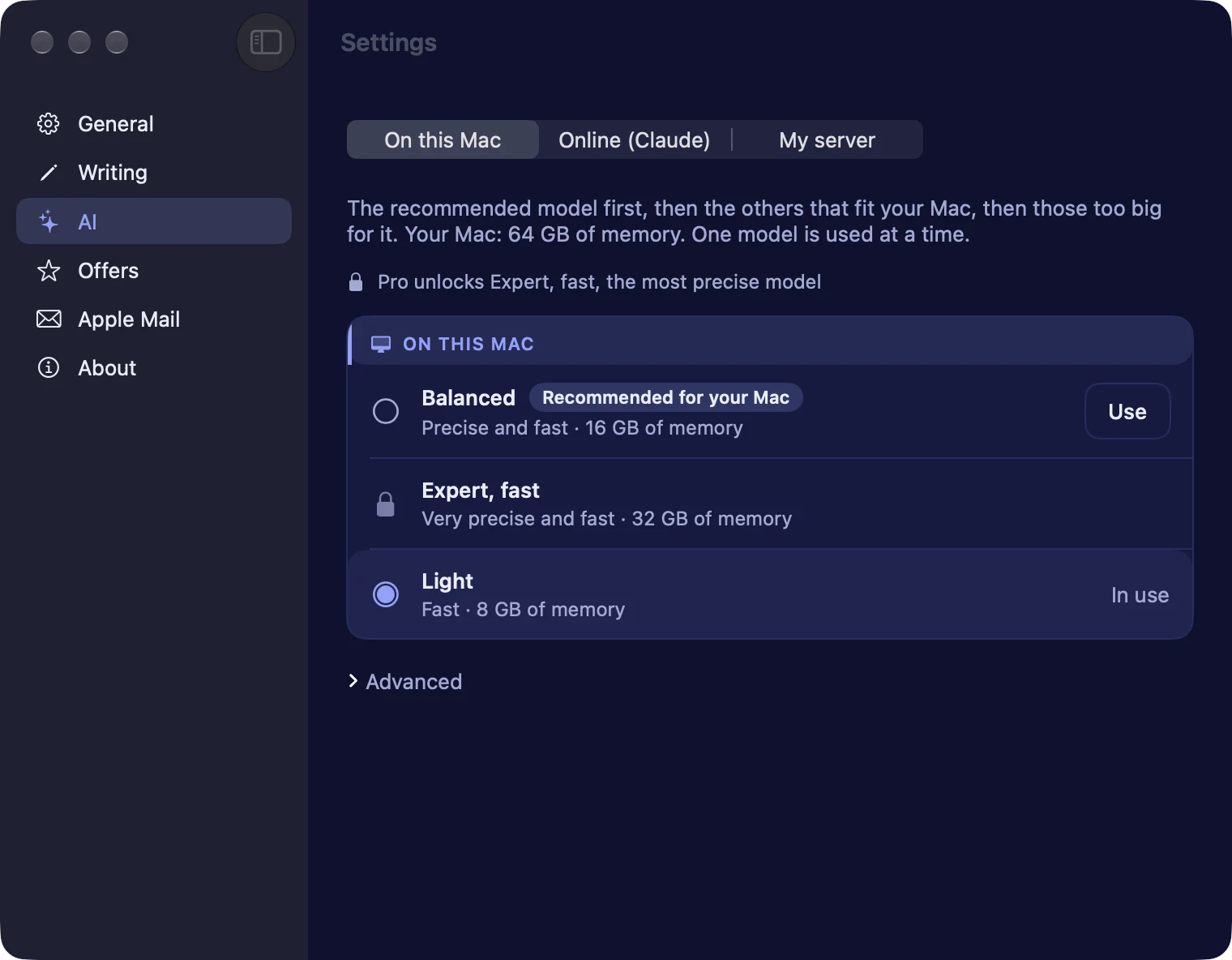
One control in the settings sets the default, a menu in the window picks the AI for one action, and you can switch at any time. The checks never need any of them.
Free and Pro
On this Mac
Private by default. Great for checks and quick drafts.
Online subscription
Online, with Claude
The best replies, 500 or 2,000 actions a month. Your text goes through the Decodr.tech server to Anthropic, is not stored, and only after your explicit consent. If the quota is used up, the model on your Mac takes over.
Pro
Your own server
Point the app at any server that speaks the OpenAI format, such as Ollama or LM Studio.
Your own AI server
Pro, My AI server
Keep your text on your own network
Point Relecture AI at a server you run yourself: any server that speaks the OpenAI format, such as Ollama, LM Studio, vLLM or llama.cpp. Your text goes only to that server.
Nothing goes through Decodr.tech or Anthropic. Your text is never sent anywhere else.
Only your server
Your texts go to the address you set, and nowhere else. If the server fails you see the error, nothing is sent elsewhere.
Mind the address
With an http address, your texts cross your local network unencrypted. https and an optional key are supported.
Yours to run
Setting up the server is up to you: it is not covered by support.
Good to know
Good to know
Results are not guaranteed.
Relecture AI is a tool that helps you answer emails faster, write and translate with the AI you choose. It is not a promise of results.
What you get depends on the model: quality, tone and accuracy can differ a lot from one model to another and from one text to another. Read every result before you send it.
Models
Models for every Mac
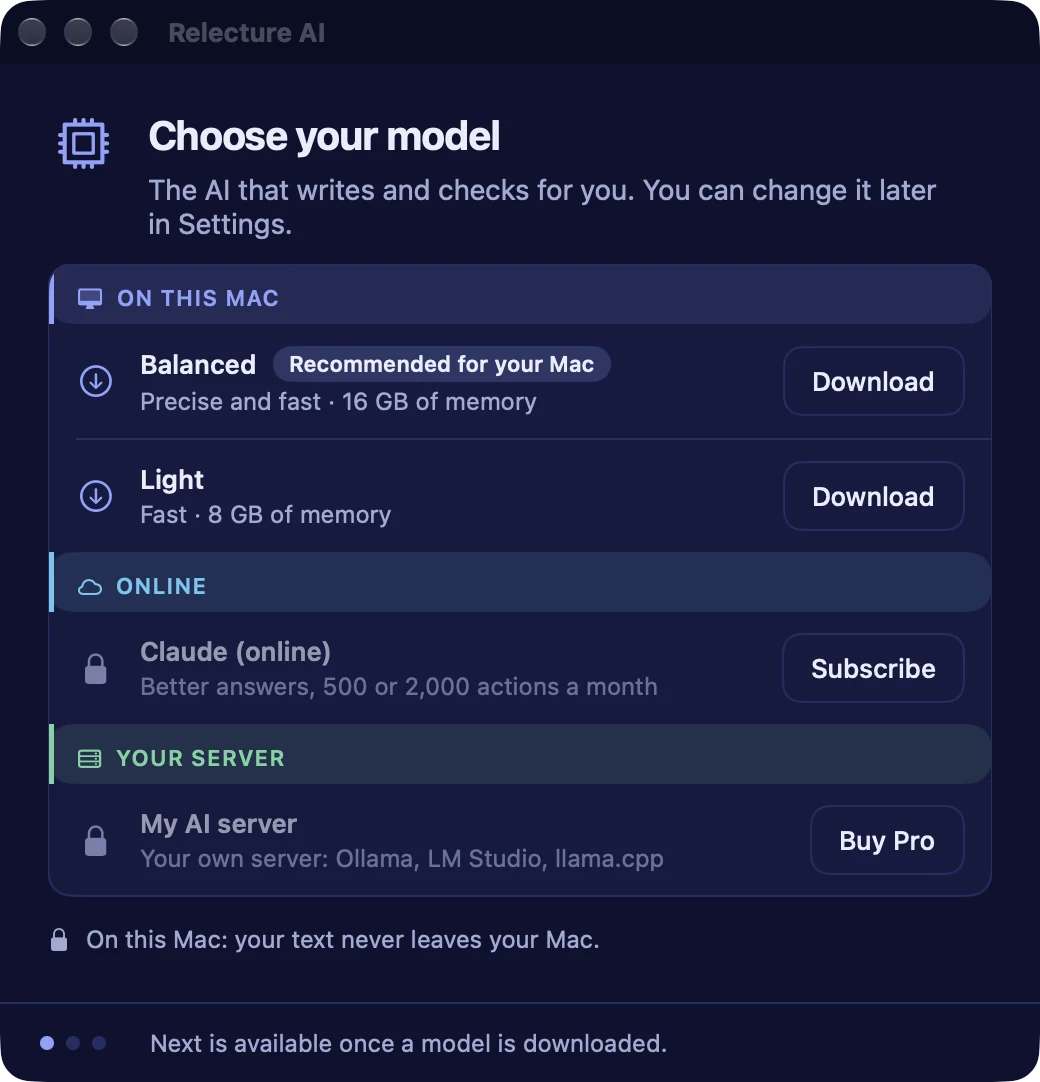
Downloaded once from the settings, with progress, pause and resume. Each one shows its quality, its speed, its size and the memory it needs. The recommended one for your Mac is picked for you, and you switch from one to another in a click. Free includes Light and Balanced, Pro adds Expert fast, the most precise one.
Light
For Macs with 8 GB of memory
Balanced
16 GB of memory, recommended
Expert fast
32 GB of memory, the most precise, with Pro
The models are open and licensed Apache 2.0. Too heavy for your Mac: greyed out, with the reason.
Pick your model at first launch
A short Get started window walks you through it: choose your model, turn on the Apple Mail extension if you use Mail, learn the right-click and the shortcuts. Everything can be shown again from the settings.
Free and Pro
Free to start, Pro when you want more
Three ways to use it. The checks are free and unlimited in all of them.
To start
Free
0EUR
- Unlimited checks and typography
- Right-click, shortcut, Mail panel
- Unlimited local AI on your Mac
- Light or Balanced model
Pro
39.9929.99EUR once
One-time purchase, all 1.x updates
- Everything in Free
- Expert fast, the most precise model
- Your own AI server
Subscription
Pro with online AI
Everything in Pro except your own server, plus Claude for the best replies.
4.99 EUR / month500 actions
9.99 EUR / month2,000 actions
- The model on your Mac takes over when the quota is used up
| Feature | Free | Pro | Online subscription |
|---|---|---|---|
| Included in Free | |||
| Business checks and typography | Unlimited | Unlimited | Unlimited |
| Preview, right-click, shortcut and Mail panel | |||
| AI on your Mac | |||
| Reformulate, reply, summarize, translate | Unlimited | Unlimited | Unlimited |
| Choice of the model | Light or Balanced | Light, Balanced and Expert fast | Light, Balanced and Expert fast |
| Your own AI server | Not included | Not included | |
| Online | |||
| Claude, for better replies | Not included | Not included | 500 or 2,000 actions a month |
| And | |||
| Price | Free | 29.99 EUR at launch, then 39.99 EUR, one time | From 4.99 EUR a month |
Pro is a one-time purchase and includes every 1.x update. The online subscription includes everything in Pro except your own AI server. No free trial. One purchase covers Mac, iPhone and iPad, with the same monthly actions.
Every device
Buy once, use it on every device
Your Relecture AI purchase follows your Apple Account to your Mac, iPhone and iPad.
Pro on the Mac, My AI server on iPhone and iPad
Bought Pro on your Mac? The iPhone and iPad app unlocks My AI server too: point it at your own OpenAI-compatible server and every action runs on it. All 1.x updates included.
Claude online subscription, on all three
A subscription taken on the Mac works on iPhone and iPad with the same plan and the same monthly actions, 500 or 2,000, shared across your devices.
Checks are free on every device
Unlimited checks run on the device, with no account, on Mac, iPhone and iPad. Only the AI actions need Claude online or My AI server.
- Buy Pro or the subscription in Relecture AI on your Mac.
- Open Relecture AI on your iPhone or iPad, signed in with the same Apple Account.
- Tap Restore Purchases if your plan does not appear. My AI server and Claude online are ready.
The models that run on the device are a Mac feature. On iPhone and iPad, the AI actions run with Claude online or your own AI server.
What's next
What's next
On the way
After the first release
- Actions and dates added to Calendar or Reminders, with your permission
- A more diplomatic version proposed when a message sounds harsh
Privacy
Your text stays on your Mac by default
The AI runs on your Mac by default, with models you download once. No account, no advertising. Anonymous usage counts can be switched off in Settings. Online AI with Claude is an optional subscription: only the text of an action goes through the Decodr.tech server to Anthropic, after your consent, and it is not stored. The emails you give as examples of your style stay on your Mac.
Questions
Questions
Does my text leave my Mac?
Not by default. The AI runs on your Mac, with no account. Only if you switch on the optional online AI with Claude does the text of an action go, after your consent, through the Decodr.tech server to Anthropic, and it is not stored. With your own AI server, it goes to that server.
Is the result guaranteed?
No. Relecture AI is a tool that lets you pick your own AI and answer emails faster, write and translate. The result depends on the model you choose and can vary a lot from one model to another. Read every result before you send it.
Is there an iPhone and iPad app?
Yes. It needs iOS 17 or later and works from the Share menu of any app, with Claude online (subscription) or your own AI server (Pro). The Mac keeps the Apple Mail panel and the AI models that run on your Mac. One purchase covers Mac, iPhone and iPad, with the same monthly actions.
Which Macs does it need?
macOS 14 Sonoma or later. The AI on your Mac needs a Mac with Apple silicon; the checks work without it.
Does it work in Mail, Outlook, Word?
In any app where you can select text: right-click, then Services or Share, or the shortcut on copied text. Apple Mail also has a panel in the compose window, with help and a check before you send.
Which languages?
The app comes in 11 languages: English, French, Spanish, German, Italian, Portuguese (Brazil), Dutch, Japanese, Chinese (Simplified), Korean and Russian. The rules are complete for French and English, the other languages get language-neutral checks, and the AI translates into 23 languages.
Does it replace my text without asking?
Never. You see every change, untick what you do not want, then copy it or replace the selection.
What does Pro add?
Expert fast, the most precise model, your own AI server and every 1.x update. The checks and the AI on your Mac with Light or Balanced stay free and unlimited.
When will it be available?
Soon. Write from the support page and I will tell you when it is out.
Built by Decodr.tech
We also build software for companies
Odoo development, migrations, support and native apps for Mac and iPhone.